products meridian
Far Horizons Meridian for car marketplaces
automotive · available to license
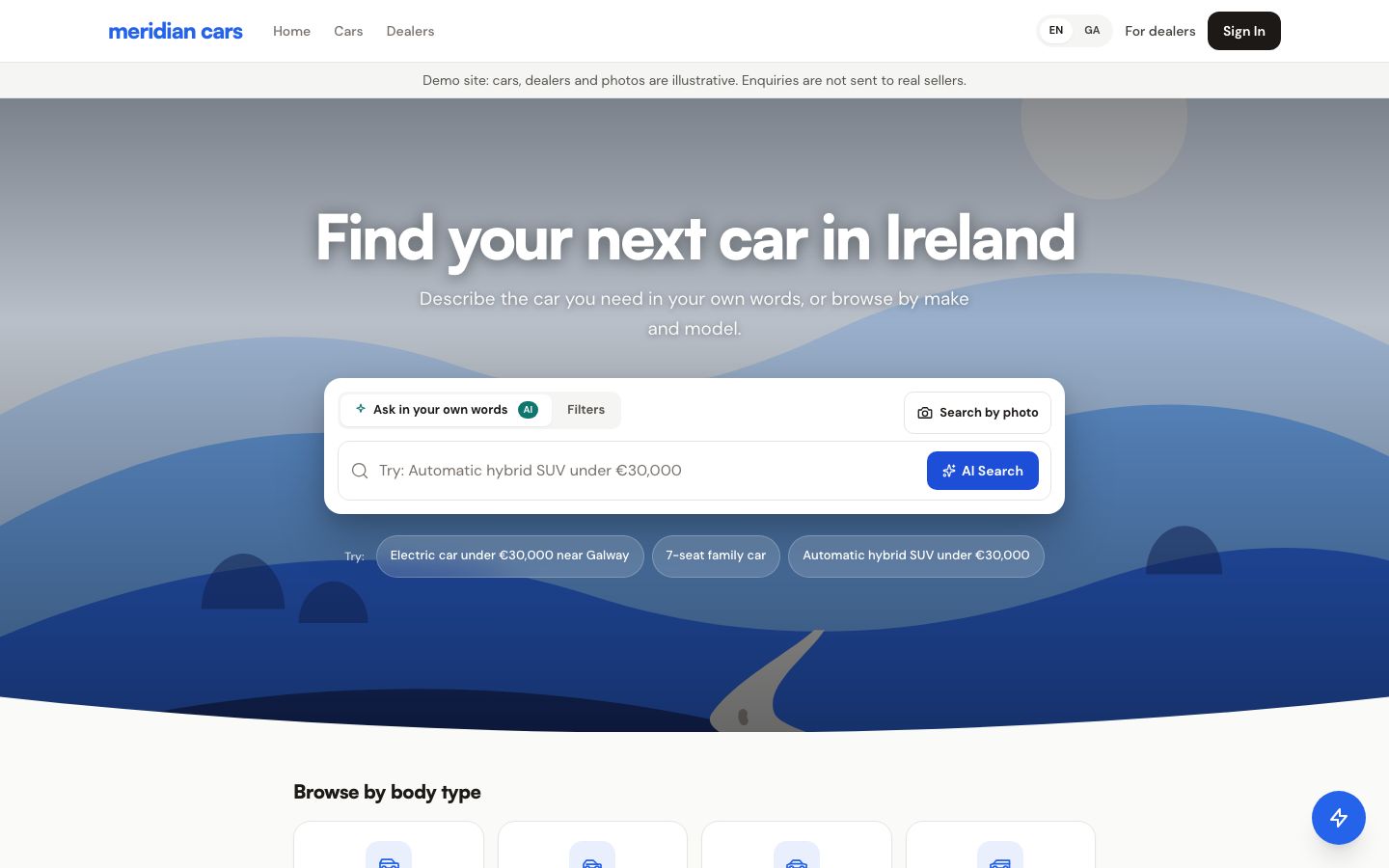
Meridian Cars is a working demo of cars as the engine's second vertical, with its own brand, search, car pages, assistant and dealer tools. The car demo holds 127 illustrative cars, from 12 invented dealers and from private sellers, set in Ireland, with car photos from Wikimedia Commons contributors. Meridian Cars' buyer website is in English and Irish. The Irish text is machine-translated and waits on a native speaker's review, and the dealer portal is in English only.
Every morning a read-only browser walkthrough checks the hosted car demo: its home page, a plain-language search, a dealer's car with its test-drive form (opened and validated but never sent), the dealer page and the MCP tool list.
In the demo means working on the hosted car demo. Built, not in the demo means the code exists but the demo does not show it. With gaps names what is missing, and every gap is listed under not built yet. Rows without a tag, such as privacy and the engine, apply to every vertical.
Inside the car demo
illustrative demo data ·
illustrative demo data ·
Screenshot: CC BY-SA 4.0.
Photo credits (6)
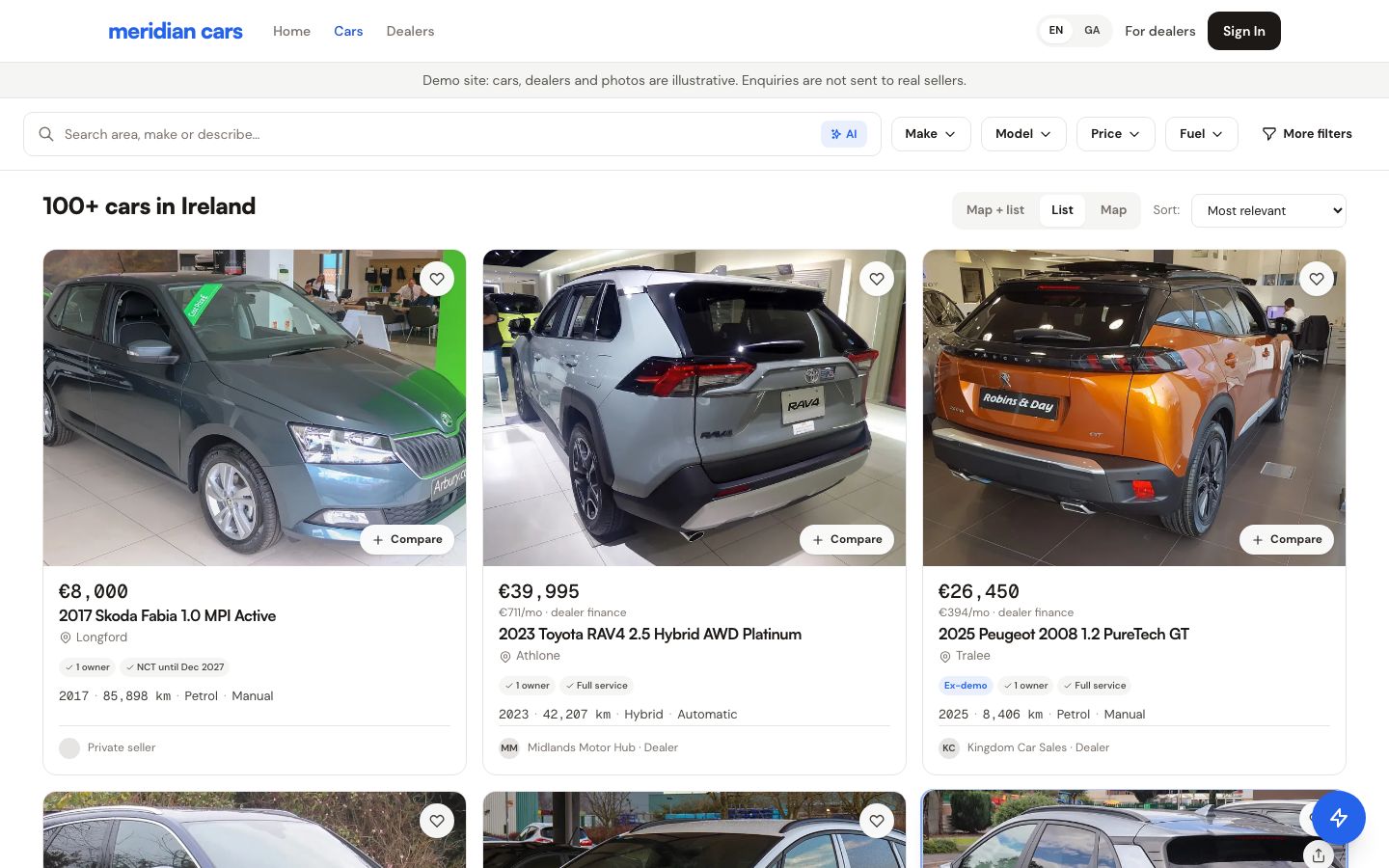
- 2018 Skoda Fabia facelift Front.jpg — Vauxford · CC BY-SA 4.0. Resized and cropped in the demo; included in this screenshot.
- Toyota RAV4 ADVENTURE (6BA-MXAA54-ANXVB) rear.jpg — Tokumeigakarinoaoshima · CC BY-SA 4.0. Resized and cropped in the demo; included in this screenshot.
- 2020 Peugeot 2008 1.2 PureTech GT Rear.jpg — Mocarey15 · CC0 1.0. Resized and cropped in the demo; included in this screenshot.
- 2017 Audi Q5 S Line TFSi Quattro 2.0 Front.jpg — Vauxford · CC BY-SA 4.0. Resized and cropped in the demo; included in this screenshot.
- 2020 Ford S-Max ST-Line facelift Front.jpg — Vauxford · CC BY-SA 4.0. Resized and cropped in the demo; included in this screenshot.
- 2019 Hyundai Kona Hybrid Premium SE GDi 1.6 Rear.jpg — Vauxford · CC BY-SA 4.0. Resized and cropped in the demo; included in this screenshot.


illustrative demo data ·
Photo credits (3)
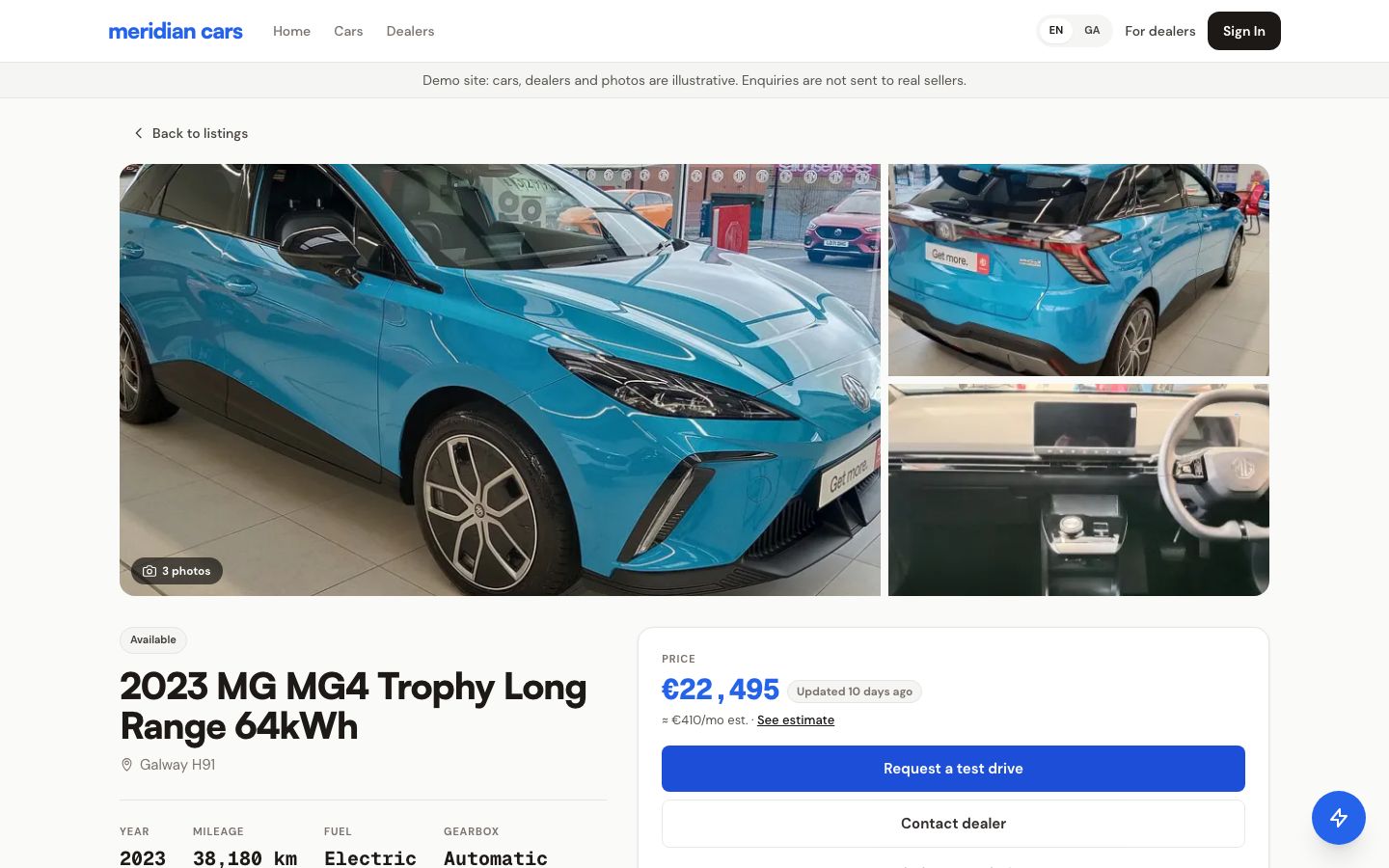
- 2023 MG 4 Trophy Long Range in Holborn Blue (Front).jpg — MoCars · CC0 1.0. Resized and cropped in the demo; included in this screenshot.
- 2023 MG 4 Trophy Long Range in Holborn Blue (Rear).jpg — MoCars · CC0 1.0. Resized and cropped in the demo; included in this screenshot.
- 2023 MG 4 Trophy Long Range in Holborn Blue (Interior).jpg — MoCars · CC0 1.0. Resized and cropped in the demo; included in this screenshot.


illustrative demo data ·
Screenshot: CC BY-SA 4.0.
Photo credits (2)
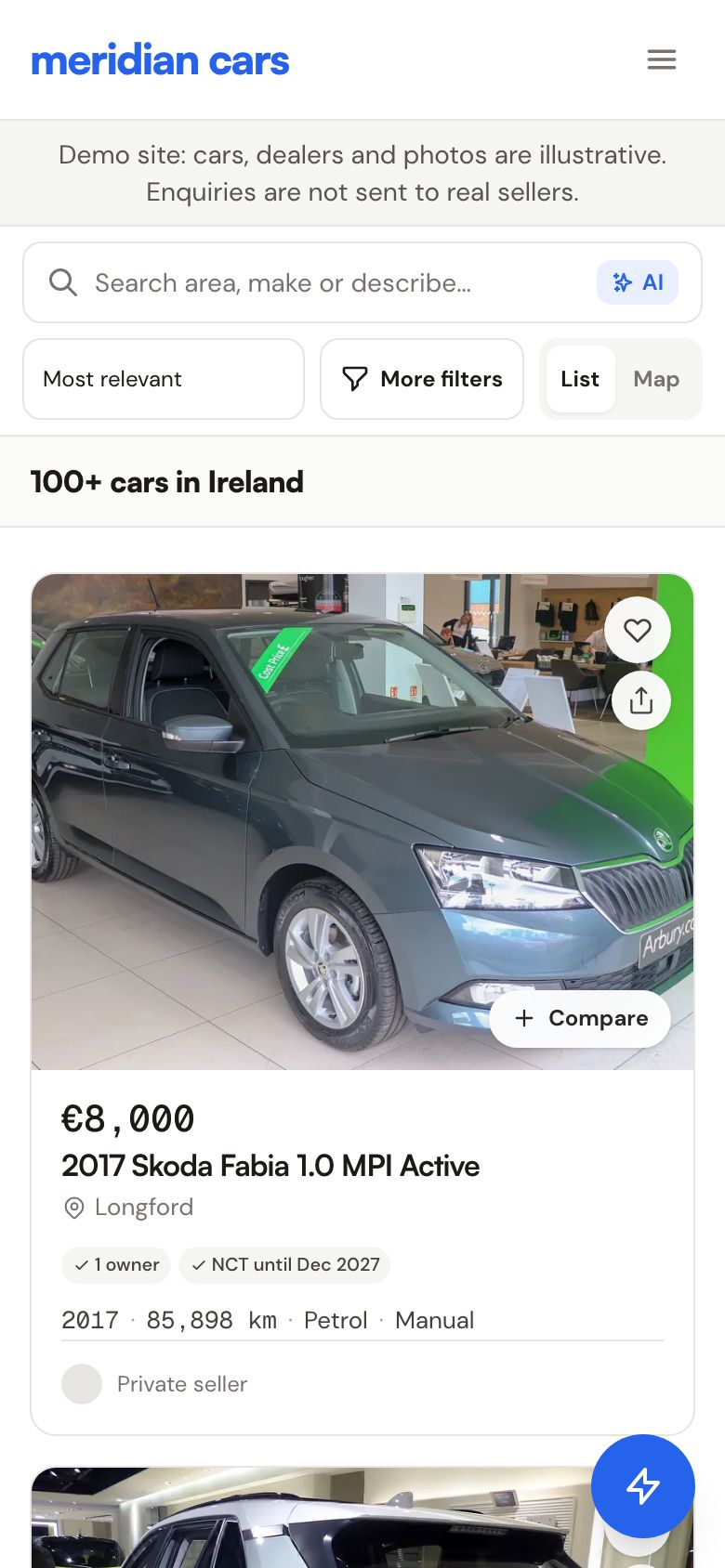
- 2018 Skoda Fabia facelift Front.jpg — Vauxford · CC BY-SA 4.0. Resized and cropped in the demo; included in this screenshot.
- Toyota RAV4 ADVENTURE (6BA-MXAA54-ANXVB) rear.jpg — Tokumeigakarinoaoshima · CC BY-SA 4.0. Resized and cropped in the demo; included in this screenshot.
How stock gets in
CSV upload
in the demo
A car dealer's owners and admins can upload the dealer's stock as a CSV file of up to 5,000 rows and match its columns to car fields; each row needs its own stock ID, and problems are reported by row, stock ID and column.
Cars from earlier uploads that are still for sale or reserved but missing from a new file go off sale, unless fewer than half of the dealer's uploaded cars for sale or reserved are in that file.
The stock feed
in the demo
Staff load a dealer's cars through an internal stock feed that checks every car against a strict vehicle schema, lets the feed mark each car sold, reserved, unavailable or withdrawn (unless moderation is holding it), and drops registration numbers and VINs before anything is stored.
Reading dealers' own websites
built, not in the demo
Meridian can also read car dealers' own websites: for a dealer's site the model writes the extraction program to the car schema, instructed to keep make, model and trim apart, convert miles to kilometres, record finance only when the monthly payment, deposit, term and APR are all shown and never output a registration or VIN, and a second model call audits its output on held-out pages before each car page is extracted by the program without a model call.
Not in the demo yet
Not in the car demo yet: price rating or automatic valuation, plate, VIN or vehicle-history lookup, dealer feed import from XML or a DMS, and test-drive slots buyers can book themselves (a buyer's test drive is a request with a preferred time; dealers schedule test drives in the back office).
What dealers get
The dealer back office
in the demo, with gaps
gaps: car-brand colours, billing, sign-in and onboarding emails
Car dealers get the same back office as estate agents, with its navigation and main screens reworded for cars: stock instead of properties, test drives instead of showings, and a dealership instead of an agency.
On the car brand, anyone signed in without a dealership starts at dealer onboarding, where they accept a team invite or apply to register their dealership, and an application that staff approve creates the dealership on the car brand it was made on.
A dealership's back-office profile also records the makes it sells (up to 60), its services (finance, warranty, delivery and trade-in), opening hours for sales, service and parts, and a company number.
Stock and the car form
in the demo, with gaps
gaps: paging past 100 cars, draft descriptions, quality grade
The dealer's stock list shows its newest 100 cars, each with its make, model, year, mileage, price, days in stock, lead count, photo count and status, and each car opens on its own page holding its form, documents and history, plus its photos when the dealer manages the car.
Dealers add cars, and edit the ones they manage, in a form built from the car field definitions, with one input per car fact in four groups (the electric group for electric and plug-in hybrid cars, or once an electric field has a value), plus price, status (draft, for sale, reserved, sold, paused or withdrawn), town, title, description, finance offer and equipment.
Dealers upload, reorder and delete a car's photos and choose its cover in the back office, and tag each photo as one of nine views: front, rear, side, interior, dashboard, boot, engine, wheels or other.
Dealers get a lead inbox that labels test-drive, trade-in and finance leads and shows the preferred slot, the trade-in car or the finance terms, plus a seven-stage pipeline board with lead analytics and team management with four roles.
Dealers can add starter reply templates for test drives, finance, trade-ins and reserved cars, which fill in the buyer's name, the car and the monthly payment and open as an email in the dealer's own mail program, held back while any variable is unfilled.
For demonstrations, including on Meridian Cars, staff can set a demo inbox on a dealer's site in the console, and that dealer's leads are emailed there instead; a test-drive, trade-in or finance lead names its kind in the subject, and a marketplace lead on a car shows the car's price, year and mileage.
Dealers manage test drives in a list, a week calendar and a detail page, where they confirm, cancel, complete or mark a no-show, and they set their working hours.
Every dealer gets a public page listing its cars, created automatically when its stock is loaded, with a path for the dealer to claim it.
Each dealer can publish its own website on the platform, listing its current stock from the catalogue, with Car, AutoDealer and stock-list structured data on its pages; the bundled themes still offer only a property filter bar and show no car specs.
On a dealer's own website, in either bundled theme, each car page carries a Request a test drive card with a preferred time and a consent box unless the dealer switches the site's contact form off, and the /appraisal page asks for the make, model, year and mileage of the buyer's car to trade in; both reach the dealer's inquiries as typed test-drive and trade-in leads.
Dealers can switch on a chat assistant on their Meridian-hosted dealer website; on the car brand it searches with the car filters and shows car facts, its tools rather than its prompt keep it to that dealer's own cars, and it is instructed to get the visitor's confirmation before sending an enquiry or a test-drive request.
more on dealer websites
Setting up a dealer website
in the demo
When a dealer creates its website it can describe the dealership in a few sentences and get a language-model draft of the tagline, about text, meta description, hero style and section order, from a prompt written for car dealers in the brand's market, or skip AI and start from defaults; the AI draft needs a plan with AI features, which every dealer on the demo car brand is given.
What buyers get
Search and filters
in the demo
The car home page lets buyers describe the car they need, browse by body type or search by photo, and shows the newest cars in a Just listed row.
Buyers can type what they want in their own words into the website's search box, and a language model turns the request into the site's search filters. The mobile app does the same but is not yet in the app stores.
On the car site, the results page names the parts of a typed request it couldn't apply and offers the assistant instead.
Car buyers have 15 car filters on top of price, location, radius and keyword: make and model (with live counts), condition, fuel, gearbox, body type, year, mileage, seats, power, colour, Euro emissions norm, previous owners, dealer or private seller, and electric range.
Car results sort six ways, including lowest mileage and newest model year, and show as a grid, a list beside a map, or a full map on which buyers can draw the area they want.
Car pages
in the demo
Each car page has a photo gallery, trust badges where earned (such as NCT valid until, one owner and full service history), a spec sheet of up to 27 fields in four groups (overview, engine and economy, electric, history and condition) showing the details the seller supplied, the seller's description, similar cars, sharing and a report-this-listing form.
Electric cars carry range, battery size, AC and DC charging power and heat pump as structured spec fields; range is a search filter, and range, battery size and DC charging are compare rows.
A reserved car stays in search results and reads Reserved on its result card, its page and its page title, and its schema.org offer is marked Reserved, while a sold car's is marked SoldOut.
Car pages carry schema.org Car and Offer data, with the seller marked up as an AutoDealer or a Person, and dealer pages carry AutoDealer.
Car pages are rendered on the server for each request.
Compare
in the demo
Buyers compare up to four cars side by side on price, location and up to 18 spec rows (seven up front, eleven under More details). The lowest price, newest model year and lowest mileage are marked with an icon, not by colour alone.
Finance, test drives and trade-ins
in the demo
If the dealer has a finance offer, the car page shows it; otherwise it shows an adjustable estimate at representative terms (10% deposit, 60 months, 7.9% APR), labelled as an estimate.
From a car page a buyer can request a test drive with a preferred time slot, ask a dealer about a trade-in or finance, or contact the seller.
On car brands a test-drive, trade-in or finance lead is refused unless it names one of the consent notices the lead forms show, and the lead stores that notice with the time it was submitted, the brand and the dealer it went to.
Signed-in car buyers can save a named search with its car filters, from a Save search button beside the filter chips, from a search that finds nothing or through the assistant, and manage their saved searches from their dashboard.
On a brand in demo mode, as Meridian Cars is, saved-search alert emails go only to a demo inbox that staff set for one of its dealers, never to the buyer who saved the search.
The assistant can work the site for the buyer: it runs searches, changes filters and sort order, switches between list and map, opens a listing, saves favourites and adds listings to compare.
On car brands the assistant answers questions about a car from that car's listed facts, such as owners, NCT, service history, battery and heat pump, and is instructed to say when a fact is not listed.
On car brands the assistant is instructed to add a short note to each car in its results, naming the buyer's criteria the car meets or where it falls short (for example, over budget), and those notes appear on the matching result cards.
On the car brand, a buyer can upload a photo of a car, and one vision-model call through the OpenRouter gateway turns it into make, model, body type and colour filters; Meridian itself does not store or log the photo.
An MCP server for AI assistants
in the demo
Each brand gets its own read-only MCP server (Model Context Protocol, an open standard AI assistants use to call a service) with three tools: search listings, get a listing, and search agencies or dealers. The brand's website points to it from /.well-known/mcp.json, llms.txt and a /for-ai page.
The Meridian Cars app offers plain-language search, a scrolling results list, a map tab, favourites synced with the website and a form to contact the seller.
In the Meridian Cars app, a car's screen has a bar to contact the dealer or seller and, unless the car is sold, to request a test drive, which sends a test-drive lead, with a preferred time (weekday daytime, weekday evening or weekend) if the buyer picks one, once the buyer has ticked the consent box beside the notice the lead records.
What your staff get
The staff admin
in the demo
In the staff console the car brand's listings read as car stock: search matches make and model, list rows and detail pages show each car's specs and, when the dealer offers one, its finance offer, and with the console switched to the car brand, or on a dealer's own page, the bulk status actions leave out Rented.
Staff open each dealer on its own console page showing its profile, home brand, plan and billing status, its active and total stock, its five newest ownership claims with their verification signal, its website and team, and its leads counted by kind with test drives, trade-ins and finance enquiries marked, without the buyers' contact details.
Your brand and languages
Brands on one deployment
Each portal is a brand defined in one typed config file (domain, vertical, languages, currency, legal entity, pricing, colours, SEO and hosts), and one deployment serves every brand by the request's host.
Brands are kept apart: each listing and dealer belongs to one brand, public searches are scoped to the brand being visited, and an unknown or mismatched host is refused rather than shown another market.
Buyers, agents and dealers sign in with email and password on their brand's own sign-in host, with a session cookie on that brand's domain, over one shared identity store.
On a car brand, a wording overlay replaces property words on the buyer website, in the dealer portal, in the app and in emails, while property brands get an empty overlay, so their text is unchanged.
In the dealer portal, a car brand's new applications, cars and accounts start in that brand's own country, currency and time zone, and example phone numbers follow its market's format.
Languages
Listings that arrive through the crawler or the car stock feed, except homes the crawler finds already sold or rented, are queued to have their title and description machine-translated into every language of their brand, and the translator skips listings whose translations were entered by hand.
Privacy and security
Where data goes
The language-model calls that parse typed searches, read car photos, run the assistant, write each site's extraction program and translate listings all go through the OpenRouter gateway.
Staff ops alerts go to Telegram and can carry only the event, the brand, the business name and an admin link, so no field exists to put a buyer's name, email, phone or message in one; an ownership claim submitted on any brand sends one.
Buyers' personal data
GDPR erasure runs an 11-step process across the assistant, personalisation, showings, catalogue, payments (anonymised), media, queued jobs, core records, login account and email history. It also runs when buyers delete their own account, retries failures up to three times, and flags requests still open after 30 days.
Buyers can download their personal data as JSON or CSV, gathered from eight data owners and available to them for 7 days.
Security
The site, back office and staff console send a hash-based Content-Security-Policy and HSTS, and signed-in requests use 15-minute signed access tokens whose signing keys rotate every 30 days.
more on privacy and security
Consent and logs
On each brand's marketplace site, the one buyers browse, cookie consent covers four categories, with every optional category off until the visitor opts in, and analytics loads only after analytics consent.
TypeScript services log through one structured logger that redacts 26 personal-data and secret field names, such as emails, phone numbers and tokens, before a line is written.
Email delivery logs and their delivery events are deleted after 30 days, up to 500 logs at a time on the notifications service's every-minute schedule.
API limits
The main GraphQL API and the consumer GraphQL API reject a query nested more than 10 levels deep before it runs, and in production they refuse schema introspection with HTTP 403.
How cars fit the engine
One engine, two verticals
One engine and one codebase run both verticals: property portals built for Sweden and Luxembourg, and a car marketplace demo set in Ireland.
One list of car filters drives the search API's input and SQL, the web filter panel, the assistant's and the MCP server's tool schemas, and the language-model parser's prompt.
What it runs on
One repository holds the platform's application code: the TypeScript and SvelteKit apps with their shared packages in a pnpm workspace, the Rust services in a Cargo workspace and the Flutter mobile app, and a test pins the deployable fleet at 21 Cloudflare Workers plus the app.
Search runs in Postgres, which the Workers reach through Cloudflare Hyperdrive: filters are SQL conditions and keywords use Postgres full-text search, with no separate search engine to run.
more on how it is built
On a developer's machine
One script boots the car demo on a developer's machine: it starts eleven local services, including the staff console and the dealer back office, loads and syncs the 127 illustrative demo cars, runs smoke queries and prints the web, console, portal, API and MCP addresses with an MCP client config.
Every change
Every pull request to main runs 14 lint gates, builds and type-checks three web frontends, type-checks twelve TypeScript services, and runs unit, Postgres integration and Rust tests.
Further verticals
Further verticals are what the engine is built to add: a new vertical starts as a new id and pack, is wired through search, the APIs and the web from a documented checklist, and ships first as a preview brand; vans or motorbikes can reuse the car field family.
The compiler and tests flag about half of the places a new vertical must fill in; a checklist taken from the cars build lists the rest.
Not built yet
Partly built means some of the code exists. Ticket only means a ticket describes it and no code does. Property only means it is built for property and not yet for cars. No dates are promised.
Planned
- partly built· the dealer back office The dealer back office in the car brand's own colours
- partly built· the dealer back office Dealer subscriptions and billing on the car brand
- partly built· the dealer back office Delivery of sign-in, approval and onboarding emails on the car brand
- partly built· stock and the car form Paging through a dealer's whole stock beyond the newest 100 cars
- partly built· stock and the car form Draft car descriptions from a language model in the dealer's car form
- partly built· stock and the car form Each car's quality grade and suggested fixes in the dealer back office
- partly built· leads Delivery of lead alert emails to dealers on the car brand
- partly built· test-drive calendar Delivery of test-drive reminder emails on the car brand
- partly built· test-drive calendar Test-drive confirmations and reminders by text message
- ticket only· dealer pages Dealer pages with opening hours, services, a map and a search of the dealer's stock
- ticket only· dealer websites A car-dealer website theme with car filters, spec sheets and finance
- partly built· dealer websites Dealer websites on the dealer's own domain
- partly built· saved searches Delivery of saved-search alert emails to buyers on the car brand
- ticket only· the assistant and photo search The assistant panel showing the cars it found and the filters it applied
- partly built· the app The Meridian Cars app in the App Store and Google Play
- partly built· the app Push alerts in the app
- property only A private-seller area for people selling their own car
- partly built· car wording and market defaults Legal pages written for a car marketplace
- partly built· car wording and market defaults Car wording in the buyer website's command palette
- ticket only· languages Irish in the dealer back office and the app
- partly built· security Two-factor sign-in, for staff as well as buyers and dealers
No ticket yet
- no ticket Price rating or automatic valuation
- no ticket Plate, VIN or vehicle-history lookup
- no ticket Dealer feed import from XML or a DMS
- no ticket Test-drive slots buyers book themselves
- no ticket Tools to move an operator's existing dealers and accounts from another platform
By design
There is no rollback step: Meridian's runbook fixes a bad deploy forward, or reverts the bad merge so that the revert goes through the same CI and deploy as any change, and migrations are forward-only.
Working together
Far Horizons builds and maintains Meridian and offers it three ways. Which one fits depends on how mature your own platform is. Prices are set per deal.
Each agreement sets where Meridian runs, who holds the code, how updates reach you and who is on call. It also sets who supports your dealers and buyers, who handles privacy and DSA requests, how your existing listings and accounts move across and what happens to the data at the end.
A managed white-label service
operated by Far Horizons · under your brand
Fits an operator with a market and a brand but a dated platform, or no engineering team to run a new one.
A licensed deployment
operated by your team
Fits an established operator with its own engineering team, who would rather run a licensed platform than rebuild one.
A partnership or revenue share
shared work · shared return
Fits an operator starting out, in a new market or another vertical, that would rather share the risk and the return than pay for a platform up front.